Netapp ONTAP ASA

What is NetApp ASA?

NetApp ASA is a platform designed for enterprises that require a block-optimized SAN solution with the simplicity, efficiency, and automation of NetApp’s ONTAP ecosystem. By eliminating NAS/Object functionality, ASA is optimized exclusively for workloads using Fibre Channel (FC), iSCSI, NVMe/FC, and NVMe/TCP. It delivers consistent performance, low latency, and seamless scalability for mission-critical applications.

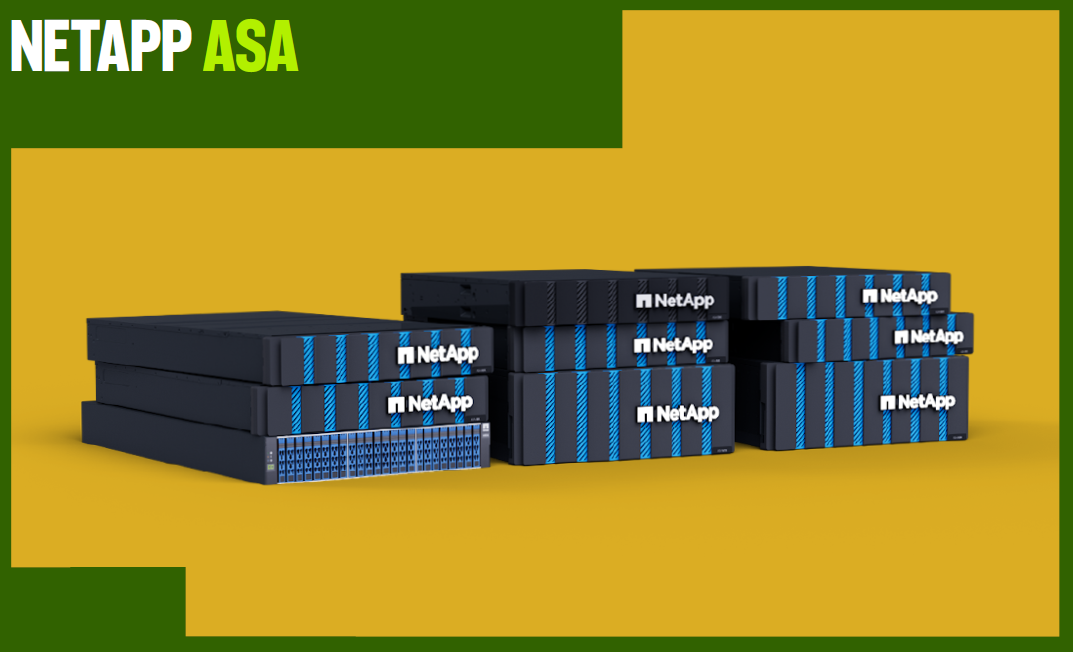
NETAPP ASA

At its core, ASA is built for simplicity and reliability. NetApp has designed the platform to be easier to deploy, manage, and scale, ensuring organizations can provision storage quickly without the complexity traditionally associated with SAN environments. The ASA architecture incorporates symmetric active/active multipathing, ensuring all LUNs are equally accessible through either controller in a HA pair, maximizing performance and resilience. NetApp’s six 9s availability guarantee (99.9999% uptime) also gives enterprise customers confidence that their critical workloads will remain operational without disruption.

NetApp ASA Hardware

At a fundamental level, NetApp ASA shares the same hardware as the AFF systems but with a SAN-specific code base optimized for block storage and simplified management.

Since the 2024 NetApp INSIGHT conference, the company has launched seven new ASA models, refreshing the platform’s hardware with a renewed focus on simplicity.

Specification

ASA A1K

ASA A90

ASA A70

ASA A50

ASA A30

ASA C30

ASA A20

Form Factor

4U

4U

4U

2U

2U

2U

2U

CPU Cores

208

128

64

48

32

20

16

Physical Memory

2048GB

2048GB

256GB

256GB

1280GB

128GB

128GB

Max Drive Count

240

240

240

120

72

72

48

NVDIMM / NVRAM

128GB

128GB

64GB

32GB

16GB

16GB

16GB

I/O Expansion Slots

18

18

18

8

8

8

8

ONTAP® Support

9.16.1+

9.16.1+

9.16.1+

9.16.1+

9.16.1+

9.16.1+

9.16.1+

This focused approach makes ASA a compelling alternative to traditional SAN arrays from competitors while maintaining the advanced data services and management capabilities that NetApp users expect. With the application-level protection and automatic failover capabilities of NetApp SnapMirror®, as well as consistent data protection and clone management from NetApp SnapCenter®, ASA delivers simplified operations and consistent data availability with zero data loss or downtime.

Beyond performance and cost, ASA’s integration with virtualized environments is another key differentiator. Tight VMware integration, including support for vSphere Virtual Volumes (vVols) and Site Recovery Manager (SRM), ensures that virtualization teams can seamlessly manage storage within familiar VMware tools. This makes ASA an attractive option for enterprises running large-scale virtualized workloads, databases, and business-critical applications that require low-latency, high-availability storage solutions.

By stripping away the complexity of a unified storage model and focusing solely on block storage, ASA lowers the barrier to entry for organizations that need high-performance, enterprise-grade SAN storage without the operational overhead. The streamlined deployment process and intuitive management tools enable IT generalists to handle provisioning and ongoing maintenance, reducing the reliance on specialized storage administrators. With a more aggressive pricing structure, ASA offers a compelling alternative for businesses seeking a reliable, cost-effective, and scalable SAN solution that aligns with modern IT infrastructure demands.

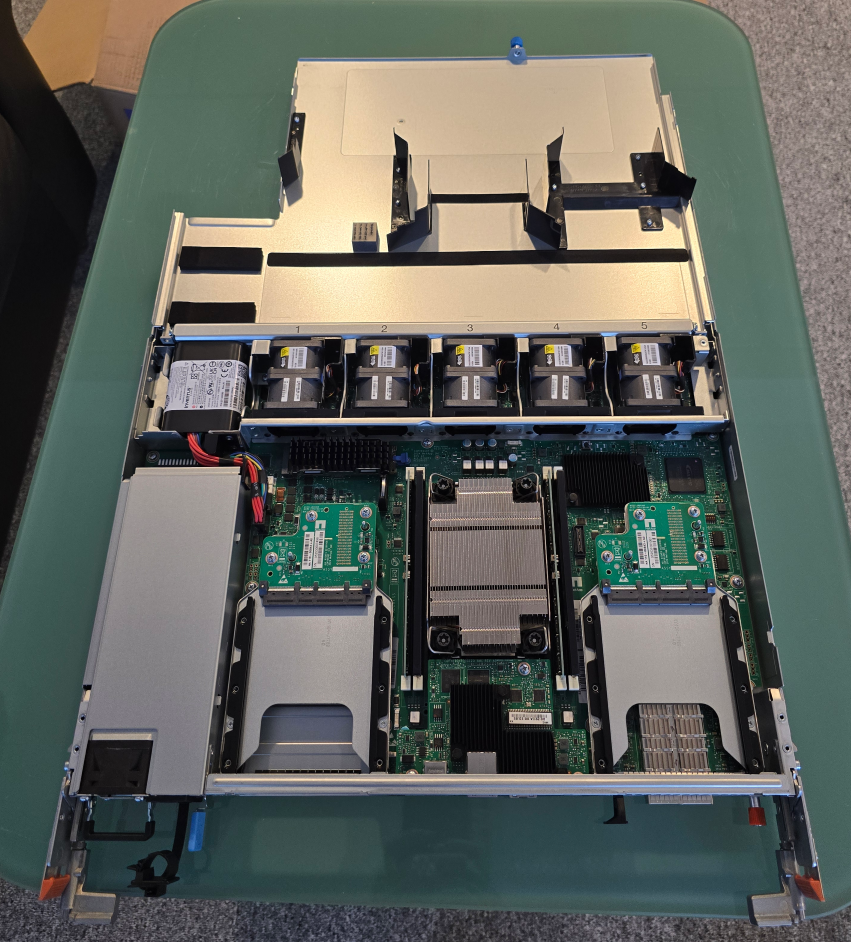
Hands on ASA A30 system.

ASA A30 is a entry-midrange system in a small 2U format.

ASA A30

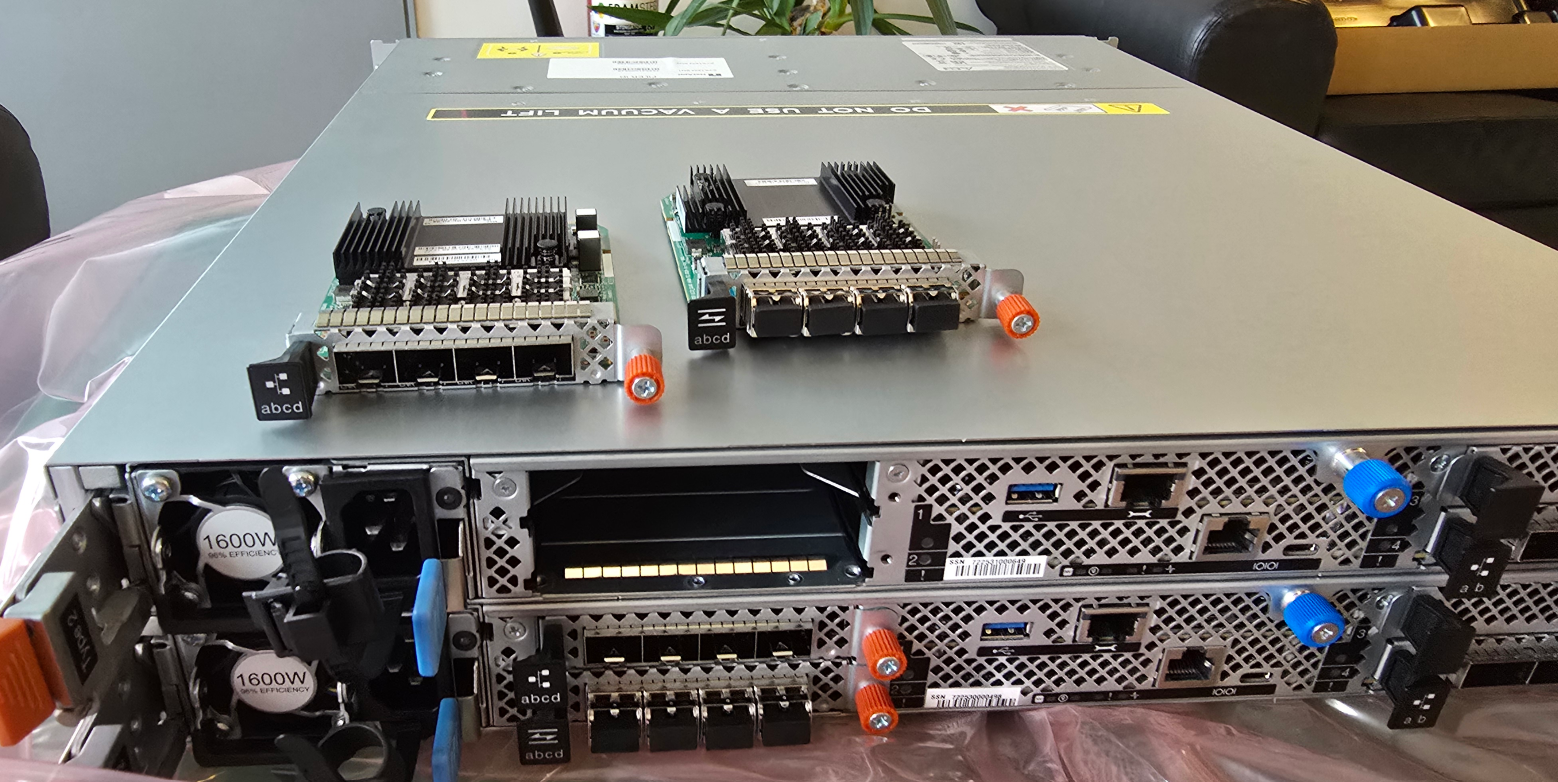
PCIE can be replaced/remove from behind, new ASA family has taken the new modular approach, all interfaces are replaceable no longer soldered to the node motherboard.

ASA A30

ASA system setup is similar to any Ontap system setup.

The GUI and the experience is simplified to be ready for production faster.

ASA system setup

Once the system is initialized (has a VIP and node ip’s set) provision of LUN’s can begin.

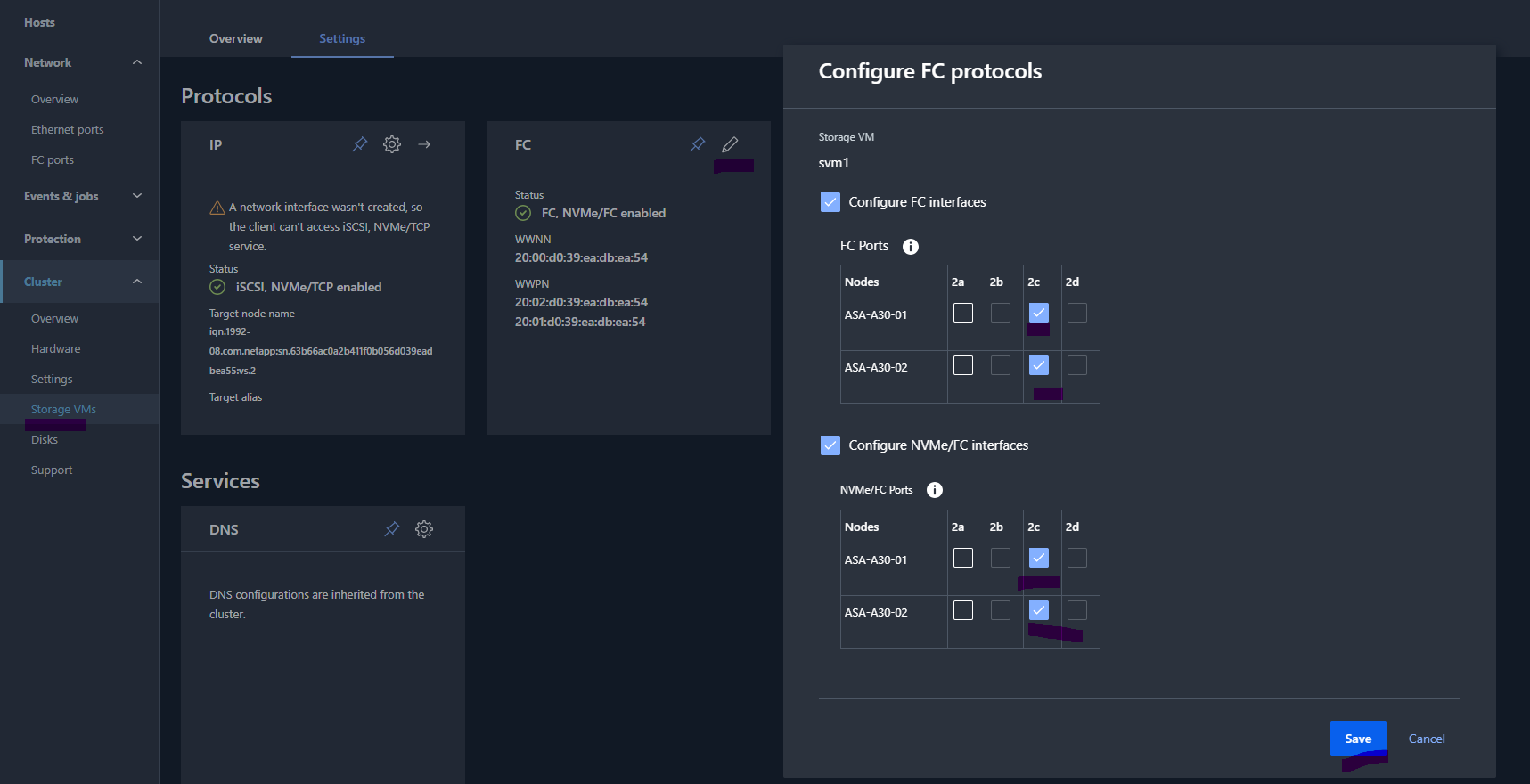
The system comes with a predefined SVM * storage virtual machine named svm1, interfaces must be configured by selecting the proper ports (cabled).

(NOTE: more SVM’s can be created from Cluster > Storage VMs tab)

ASA system setup

Once the ports are selected from SVM config the interfaces will be created.

ASA system setup

Those Interfaces should be included in zones (the lifs are using NPIV)

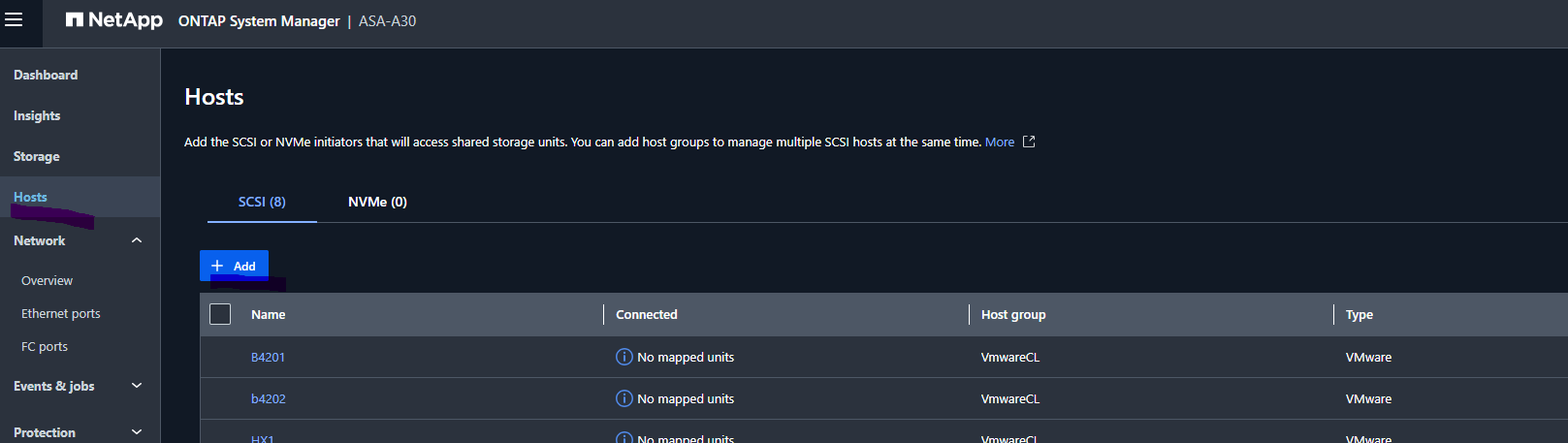
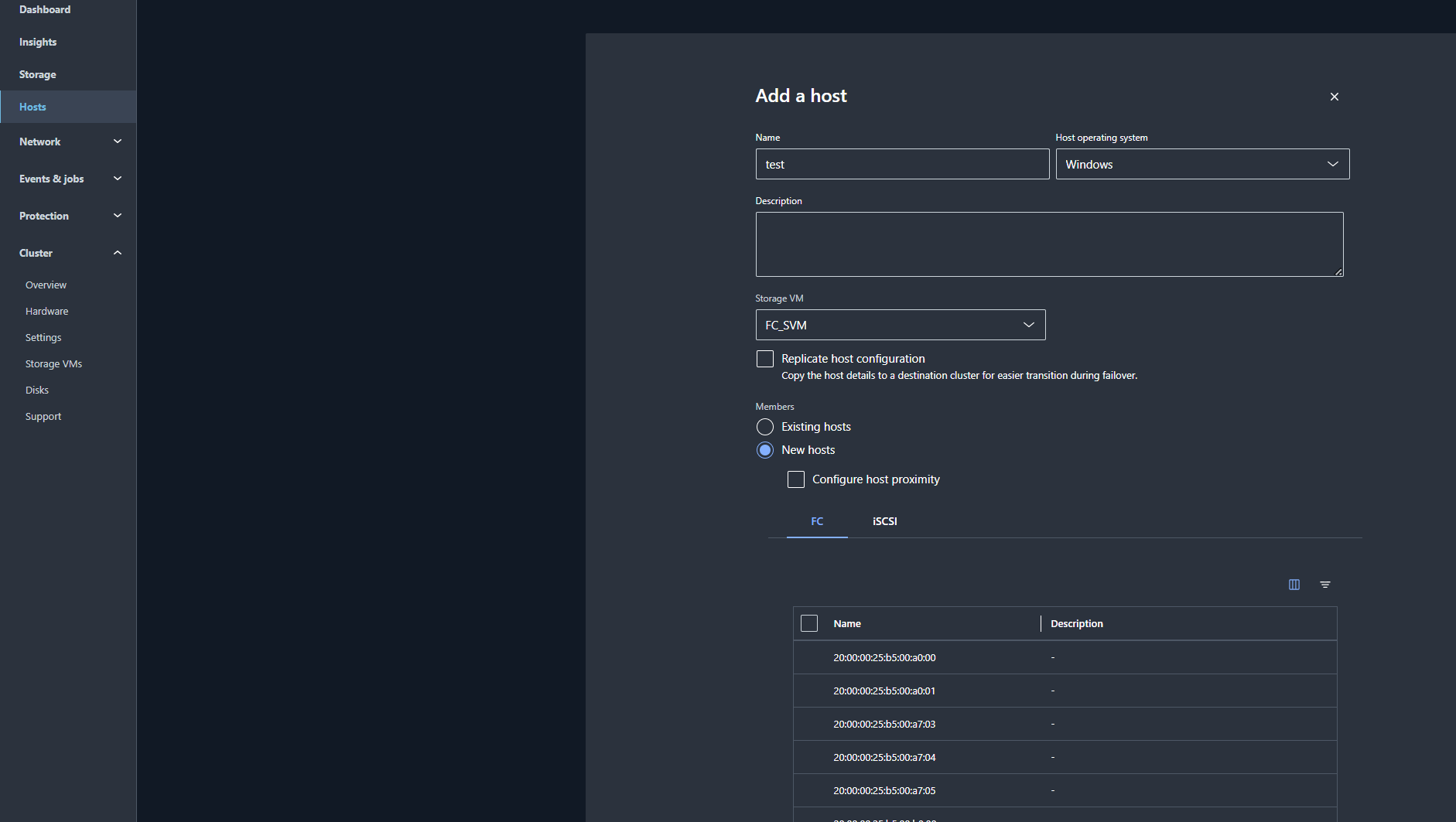
Initiator groups or Hosts can be done from Hosts tab:

ASA system setup

To create a host click ADD.

ASA system setup

Lun Creation is simplified  (the container volume creating is hidden).

For each LUN a container volume is created; to create a volume navigate to Storage and click > ADD (the mapping is guided in the provisioning, already created hosts should be used to map the LUNs).

ASA system setup

The space is consumed from a pod aggregate that contains capacity from all the drives.

Drives are assigned to pod aggregate.

ASA-A30::> disk show

Disk Usable Size Shelf Bay Type Container Type Container Name
1.0.0 1.74TB 0 0 SSD-NVM aggregate pod_NVME_SSD_1
1.0.1 1.74TB 0 1 SSD-NVM aggregate pod_NVME_SSD_1
1.0.2 1.74TB 0 2 SSD-NVM aggregate pod_NVME_SSD_1
1.0.3 1.74TB 0 3 SSD-NVM aggregate pod_NVME_SSD_1
1.0.4 1.74TB 0 4 SSD-NVM aggregate pod_NVME_SSD_1
1.0.5 1.74TB 0 5 SSD-NVM aggregate pod_NVME_SSD_1
1.0.18 1.74TB 0 18 SSD-NVM aggregate pod_NVME_SSD_1
1.0.19 1.74TB 0 19 SSD-NVM aggregate pod_NVME_SSD_1
1.0.20 1.74TB 0 20 SSD-NVM aggregate pod_NVME_SSD_1
1.0.21 1.74TB 0 21 SSD-NVM aggregate pod_NVME_SSD_1
1.0.22 1.74TB 0 22 SSD-NVM aggregate pod_NVME_SSD_1
1.0.23 1.74TB 0 23 SSD-NVM spare Pool0

12 entries were displayed.

ASA-A30::>


In CLI Admin prompt aggregates are hidden except the pod one; in diag mode aggregates are exposed.

ASA-A30::*> aggr show

Aggregate Size Available Used % State # Vols Node RAID Status
dataFA_2_p0_i1 2.12TB 2.05TB 3% online 7 ASA-A30-01 -
dataFA_4_p0_i1 12.03TB 1.71TB 86% online 13 ASA-A30-02 -
pod_NVME_SSD_1 0B 0B 0% online 22 ASA-A30-01 raid_dp, normal
rootFA_1_p0_i1 380.1GB 343.6GB 10% online 1 ASA-A30-01 -
rootFA_3_p0_i1 380.1GB 345.3GB 9% online 1 ASA-A30-02 -

5 entries were displayed.

There are 5 aggregates: 2 Data aggregates and 2 root aggregates beside the pod aggregate that owns all the volumes.

The lun created during provisioning is contained in volume of 420TB (thin container); container volume shows as owned by pod aggregate (pod_NVME_SSD_1) and the space is dynamically consumed from data aggregate.

Ex:

We have one lun of 10tb that is filled in on a host using a script to generate unique random data; the scope is to determine data placement and how hidden data aggregates are used since we have pod aggregate shown as below.

ASA-A30::*> vol show -vserver FC_SVM

Vserver Volume Aggregate State Type Size Available Used %
FC_SVM ASAA30_DatastoreT1_2TB_1 dataFA_2_p0_i1 online RW 420TB 2.05TB 30%
FC_SVM RDM_test_linux_1 dataFA_4_p0_i1 online RW 420TB 1.71TB 30%
FC_SVM lun10tb_1 dataFA_4_p0_i1 online RW 420TB 1.71TB 33%

ASA-A30::*> lun show -vserver FC_SVM

Vserver Path State Mapped Type Size
FC_SVM ASAA30_DatastoreT1_2TB_1 online mapped vmware 2TB
FC_SVM lun10tb_1 online mapped vmware 10TB

ASA-A30::*>

ASA-A30::*> storage aggregate show

Aggregate Size Available Used % State # Vols Node RAID Status
dataFA_2_p0_i1 2.12TB 2.05TB 3% online 7 ASA-A30-01 -
dataFA_4_p0_i1 12.03TB 1.71TB 86% online 13 ASA-A30-02 -
pod_NVME_SSD_1 0B 0B 0% online 22 ASA-A30-01 raid_dp, normal
rootFA_1_p0_i1 380.1GB 343.4GB 10% online 1 ASA-A30-01 -
rootFA_3_p0_i1 380.1GB 345.1GB 9% online 1 ASA-A30-02 -

5 entries were displayed.

ASA-A30::*>

The 10TB lun was placed under dataFA_2_p0_i1

ASA-A30::*> lun show -vserver FC_SVM -path lun10tb_1 -fields aggregate

Vserver Path Aggregate
FC_SVM lun10tb_1 dataFA_4_p0_i1

The hidden data aggregates are dynamically resized  ; dataFA_4_p0_i1 started at 7tb and it was dynamically increased to 12.03TB to host the 10TB lun   ;  this is hidden in the gui and only visible in diag mode .


In CLI to see the utilized space on ASA there is a new command :  cluster space show


ASA-A30::*> cluster space show

Total Cluster Size: 14.89TB

Total Cluster Physical Used: 11.13TB

Total Cluster Available: 3.76TB

Total Cluster Metadata Used: 1.04TB

Physical User Data Without Snapshot Copies: 10.09TB

Logical User Data Without Snapshot Copies: 10.61TB

Data Reduction Ratio Without Snapshot Copies: 1.05:1

Physical Space Used Percent Across the Cluster: 74%

Cluster Full Threshold Percent: 98%

Cluster Near Full Threshold Percent: 95%

Delayed Free Space Across the Cluster: 18.97GB

Unusable Space Across the Cluster: -

Metadata Space Used by system logs, cores across Cluster: 760.1GB

ASA-A30::*>

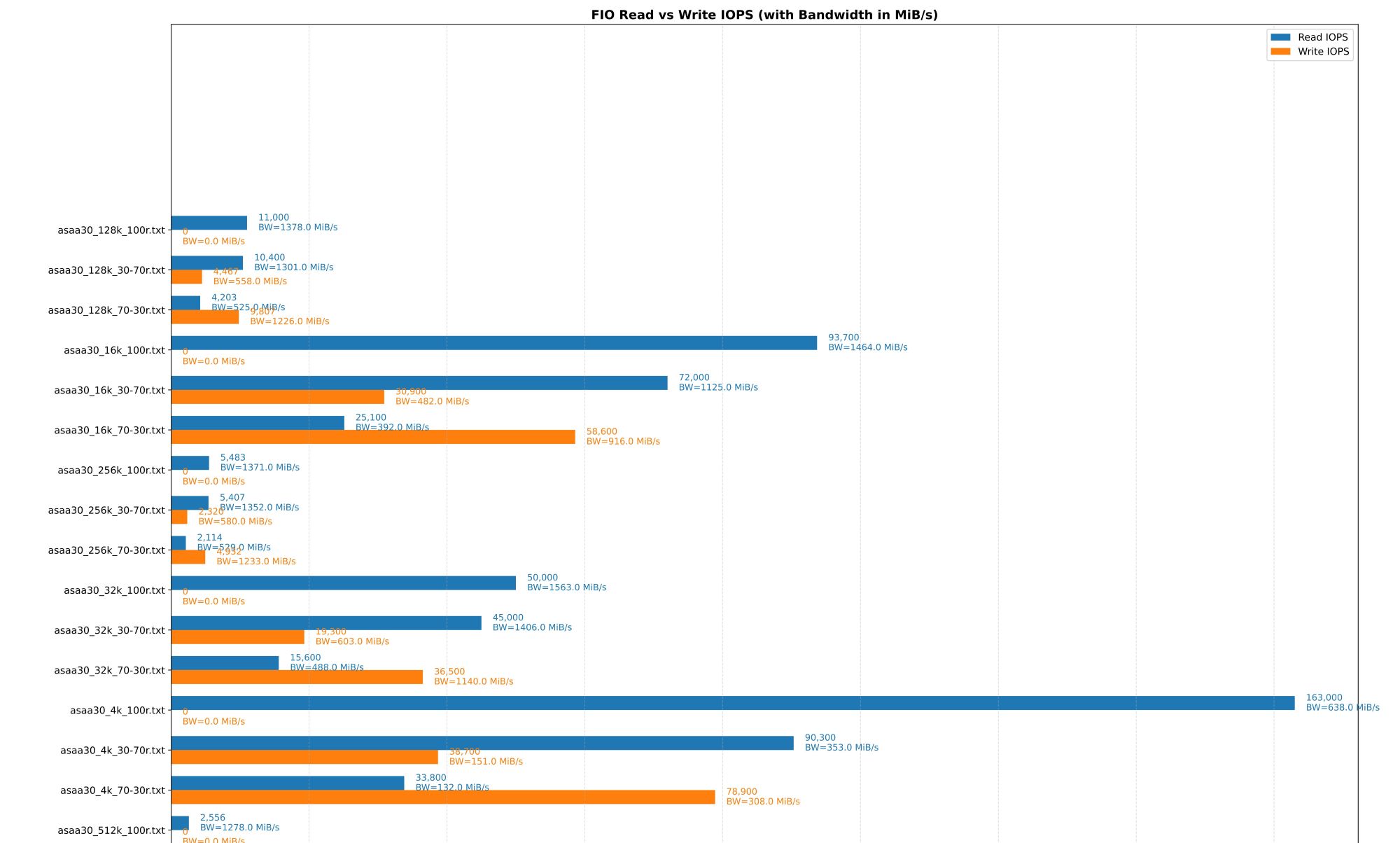
Testing Performance using FIO and windows / linux hosts in  a FC environment.

Fio templates above.


--------------------------------------------------------------------------------------------------------------------------------------------------------------------------------------------------------------------------------

#

fio --name=randrw --ioengine=libaio --iodepth=16 --rw=randrw --bs=4k --direct=1 --size=1g --numjobs=16 --runtime=120 --group_reporting --time_based --rwmixread=30 > asaa30_ml_4k_70-30r.txt

fio --name=randrw --ioengine=libaio --iodepth=16 --rw=randrw --bs=8k --direct=1 --size=1g --numjobs=16 --runtime=120 --group_reporting --time_based --rwmixread=30 > asaa30_ml_8k_70-30r.txt

fio --name=randrw --ioengine=libaio --iodepth=16 --rw=randrw --bs=16k --direct=1 --size=1g --numjobs=16 --runtime=120 --group_reporting --time_based --rwmixread=30 > asaa30_ml_16k_70-30r.txt

fio --name=randrw --ioengine=libaio --iodepth=16 --rw=randrw --bs=32k --direct=1 --size=1g --numjobs=16 --runtime=120 --group_reporting --time_based --rwmixread=30 > asaa30_ml_32k_70-30r.txt

fio --name=randrw --ioengine=libaio --iodepth=16 --rw=randrw --bs=64k --direct=1 --size=1g --numjobs=16 --runtime=120 --group_reporting --time_based --rwmixread=30 > asaa30_ml_64k_70-30r.txt

fio --name=randrw --ioengine=libaio --iodepth=16 --rw=randrw --bs=128k --direct=1 --size=1g --numjobs=16 --runtime=120 --group_reporting --time_based --rwmixread=30 > asaa30_ml_128k_70-30r.txt

fio --name=randrw --ioengine=libaio --iodepth=16 --rw=randrw --bs=256k --direct=1 --size=1g --numjobs=16 --runtime=120 --group_reporting --time_based --rwmixread=30 > asaa30_ml_256k_70-30r.txt

fio --name=randrw --ioengine=libaio --iodepth=16 --rw=randrw --bs=512k --direct=1 --size=1g --numjobs=16 --runtime=120 --group_reporting --time_based --rwmixread=30 > asaa30_ml_512k_70-30r.txt

#

Tests were done in all random 70-30rw 30-70rw and 100read scenarios ( the example above is for 30-70rw )

Netapp ASA shows strong performance and low latency SAN workloads (* single LUN workloads latency were noticeable improved versus unified AFF systems).

Conclusion

By focusing exclusively on Fibre Channel, iSCSI, and NVMe/FC, ASA makes a direct competitor to traditional SAN arrays while retaining NetApp’s core strengths in resiliency, data services, and simplified management.

ASA now offers a streamlined, block-optimized experience tailored to organizations that don’t need file storage but still want the performance, efficiency, and automation of ONTAP.

Learn more about Netapp ONTAP ASA


This site is protected by reCAPTCHA and the Google Privacy Policy and Terms of Service apply.


NetApp Distributor Partner